 How-to
Why Do Teachers Need Ergonomic Desk Accessories?
Last Updated: November 12, 2026
Quick Summary
Teachers need ergonomic desk accessories because teaching involves a lot of standing, bending, and hunched sitting, and that strain builds up over a school year. Accessories such as desk mats, wrist rests, monitor stands, and footrests keep the body supported while you work.
- Teaching is physical work, and small strains add up over a full school year.
- Sore lower backs and wrist discomfort are often the first warning signs.
- Set chair height so your feet are flat on the floor and knees sit at or below hip height.
- Keep elbows near a 90-degree angle with forearms roughly level with the desk.
- Place the top of the monitor at or just below eye level to keep the neck neutral.
Table of Contents
- Why Teaching Days Take a Physical Toll
- The Case for Ergonomic Desk Accessories in the Classroom
- Setting Up a Teacher Workspace Step by Step
- Teacher Desk Organization Ideas That Support Good Posture
- Choosing the Best Teacher Desk Organizer for Your Space
- Budget Options and Accessibility Considerations
- Finding the Right Setup for Your Next School Year
- Frequently Asked Questions
Why Teaching Days Take a Physical Toll
Teaching looks like a job done mostly from the front of the room, but it is physical work. Teachers stand, bend, lean over student desks, and sit hunched at a desk for grading and planning. Over a full school year, those small strains add up.
Most teachers do not notice the damage until it becomes a steady ache. A sore lower back after a long day is often the first sign. Wrist discomfort from typing lesson plans follows close behind.
Many teachers find that the desk they are given rarely fits their body. Chairs are set at a fixed height and monitors sit wherever there is room. A well-chosen accessory can change a teacher's daily comfort.
The Case for Ergonomic Desk Accessories in the Classroom
Ergonomic desk accessories are tools that help your body stay in a comfortable, supported position while you work. They include desk mats, wrist rests, monitor stands, footrests, and organizers that keep your tools within easy reach.
Here is why they matter for teachers:
- They reduce reaching. Items placed within arm's length cut down on twisting and stretching.
- They support your wrists. A padded mat or wrist rest lowers strain during long typing sessions.
- They keep your workspace clear. A tidy desk means fewer trips and less bending.
- They help you move more. A footrest or sit-stand setup encourages small shifts in position.
A common mistake is buying one item and expecting it to fix everything. Ergonomics works best when several small changes support each other.
Setting Up a Teacher Workspace Step by Step
A classroom desk has to serve several jobs in one day: grading papers, typing lesson plans, writing at an awkward angle, and turning to help a student. Set it up for the task you do most, then check the fit with a measurement rather than a feeling.
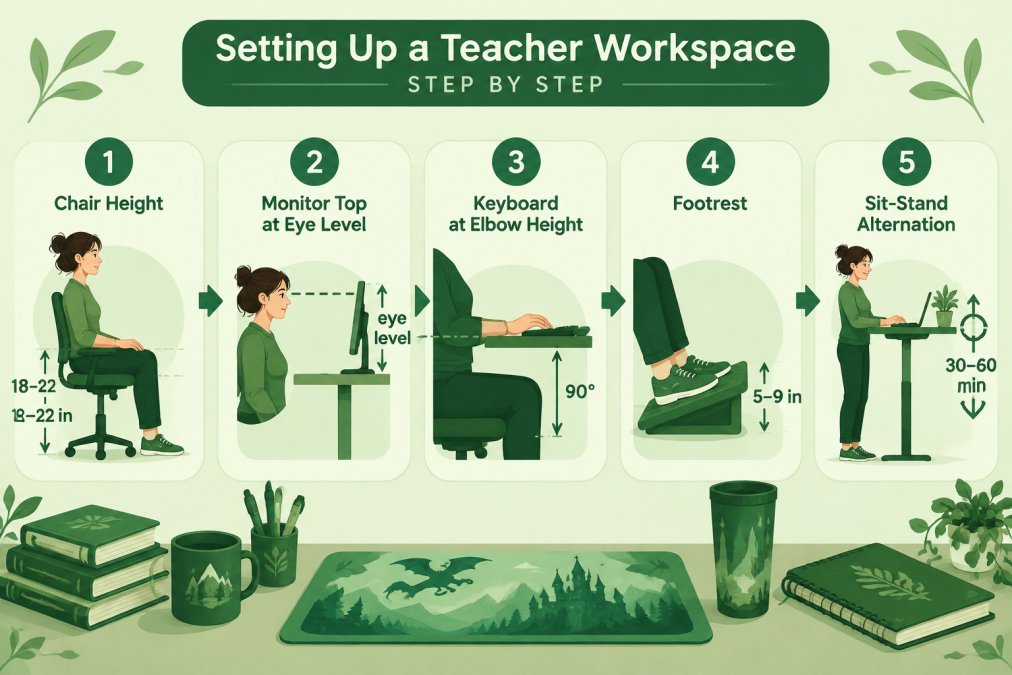
1. Set the chair height first. Sit with your feet flat on the floor. Your knees should be at or slightly below hip height, and the seat pan should leave about two to three fingers of space behind your knees so the edge does not press into your legs.
2. Match the desk to your elbows. With your shoulders relaxed, your elbows should rest near a 90-degree angle and your forearms should be roughly level with the desk surface. If the desk is too high, a keyboard tray or an adjustable chair brings your arms down.
3. Place the monitor for your reading distance. Sit back in the chair, then extend one arm toward the screen. The screen should be roughly at fingertip distance, with the top of the screen at or just below eye level.
4. Position the keyboard and mouse for grading and typing. Keep the keyboard close enough that your elbows stay near your sides, and put the mouse at the same height as the keyboard so you are not reaching up or across. A wrist rest supports the heel of the hand between keystrokes; it should not press into the wrist while you type.
5. Add lower-body support. A footrest helps when your feet dangle or when you want to shift weight during long grading sessions. Set it so your thighs stay roughly parallel to the floor, and move it aside when you stand.
6. Plan the transitions, not just the seated position. The biggest teacher-specific strain comes from moving between sitting, standing at the board, and leaning over student desks. Alternate between sitting and standing during planning periods, and keep a stool or tall chair near the board if you stand for long stretches.
Watch out: Raising the monitor too high is a common setup error. It pushes the chin up and the neck forward, which creates tension across the shoulders and upper back. Lower the screen until the top edge sits at or just below eye level.
A simple fit check: after 20 minutes of grading, notice whether you are leaning forward, resting your wrists on the desk edge, or sliding toward the front of the seat. Each of those is a signal that the chair, desk, or screen height needs another adjustment.
The steps below walk through the setup in order, with the specific check or measurement for each.
| Step | What to check | Target |
|---|---|---|
| 1. Chair height | Feet flat on the floor | Knees at or slightly below hip height |
| 2. Desk height | Elbow angle with relaxed shoulders | Elbows near 90 degrees |
| 3. Monitor | Distance and top edge | Fingertip distance, top at or below eye level |
| 4. Keyboard and mouse | Elbow position and reach | Elbows near sides, mouse level with keyboard |
| 5. Footrest | Thigh angle | Thighs roughly parallel to the floor |
| 6. Transitions | Sitting, standing and leaning | Alternate sitting and standing during planning periods |
Teacher Desk Organization Ideas That Support Good Posture
Good organization protects your posture because it reduces the reaching and twisting that wear on your back and shoulders. Start with the items you use most.
- Keep frequently used supplies in a shallow tray within arm's reach.
- Store reference books and binders on a shelf at eye level.
- Use a desk mat to define your typing zone and keep the keyboard in the same spot each day.
- Place a small trash bin close to your primary seated position.
These ideas are simple, but they make your day smoother. Browse the Teacher Collection to see the teacher-focused desk accessories we offer.
Choosing the Best Teacher Desk Organizer for Your Space
The best organizer depends on how much room you have and what you need to reach most often. A small corner desk needs a compact tray. A larger teaching station can handle a multi-compartment organizer.
Consider these questions before you buy:
- How much desk surface do I actually have?
- Do I need to store paper, pens, or tech accessories?
- Will the organizer block my monitor or keyboard?
- Can I move it easily when I rearrange the room?
Our Teacher Collection includes teacher gifts and desk accessories. For desk mats, see our Mythikal Sundries™ Desk Mats collection.
Budget Options and Accessibility Considerations
Ergonomic adjustments do not require a full furniture replacement. Most teachers can make the biggest improvements with items already in the classroom, then spend on the one or two accessories that address their specific discomfort.
Low-cost fixes using what you already have:
- Raise the monitor with books or a box. A stack of sturdy textbooks under the stand brings the screen to eye level at no cost. Check that the stack is stable and does not block vents.
- Use a folded towel as a lumbar roll. Roll a bath towel or sweater and place it in the small of your back against the chair. It costs nothing and can be adjusted as you shift.
- Repurpose a box or step stool as a footrest. A sturdy box under the desk gives your feet something to rest on when the chair is set high.
- Move the most-used items within arm's reach. Rearranging a desk so pens, grade book, and phone sit within a forearm's length reduces reaching without buying anything.
Where spending helps:
- A desk mat or wrist rest is worth buying if you type lesson plans for long stretches and notice wrist or forearm fatigue. Look for a mat with a soft but firm surface that does not sink under the wrist.
- A footrest is worth buying when a box is too tall, too short, or unstable. Adjustable footrests let you change the angle during the day.
- A monitor stand or arm is worth buying when books make the screen unstable or when you need to switch between sitting and standing.
- An organizer or tray is worth buying when your desk surface is shared or small and supplies keep drifting out of reach.
Pricing depends on quantity, dates, and delivery, so check Mythikal Sundries LLC's website for current prices or a quote before ordering for a department or grade level. A practical approach is to fix the free items first, then buy the single accessory that matches the discomfort you notice most.
Accessibility and body-size considerations:
A setup that fits one teacher may not fit another. Adjustability matters more than any single product.
- Height differences. Shorter teachers often need a footrest and a lower desk or keyboard tray; taller teachers often need a higher desk or monitor stand and more legroom. Neither is a failure of the setup, it is a signal to adjust.
- Mobility needs. If you use a wheelchair or have limited reach, keep frequently used items within a comfortable arc and keep pathways clear. Check that a desk mat does not create a lip that catches wheels.
- Pregnancy and existing pain. During pregnancy, a footrest and a lumbar roll can reduce lower-back load, and standing breaks matter more. If you already have back, wrist, or neck pain, make one change at a time and note whether it helps over a week.
- Shared desks. If you move between rooms, choose accessories that are light and easy to reposition, such as a folding footrest or a mat that rolls up.
Watch out: Buying a full matching set before testing one item is a common mistake. Start with the free adjustments, add one accessory, and give it a week of real teaching days before buying more.
Finding the Right Setup for Your Next School Year
Start with one change this month. Adjust your chair, move your monitor to eye level, or add a footrest. Then check how your body feels after a full week of teaching.
Set a simple check: note any ache at the end of each day. If the same discomfort returns, adjust the setup again. Small, steady changes add up to a workspace that supports you all year.
Mythikal Sundries LLC offers original fantasy-themed desk mats, drinkware, and apparel, plus a collection made for educators. Explore our full range and find pieces that make your classroom feel a little more like your own. Shop All at Mythikal Sundries LLC to start building your setup.
Frequently Asked Questions
What does every teacher need on their desk?
Most teachers need a stable, clutter-free surface with room for a laptop, a monitor if used, a keyboard and mouse, and a few reachable storage tools for pens, sticky notes and paperwork. Keeping daily-use items within arm's reach reduces repeated twisting and reaching. A desk mat with a wrist rest and a monitor riser are two of the most practical additions for grading and lesson planning. Pricing for these items varies by brand, size and quantity, so check Mythikal Sundries LLC's website for current options or a quote.
Which ergonomic accessories are useful for teachers?
The most useful accessories address the body positions teachers hold most often. A footrest supports the lower back when seated, a monitor stand brings the screen to eye level, and a wrist rest helps keep the forearms supported during typing. A lumbar cushion helps during long stretches at a chair, and a sit-stand converter lets teachers change position during the day. Start with the one that addresses your most common discomfort, then add others as needed.
How should a teacher position a computer monitor and keyboard?
Place the top of the monitor at or slightly below eye level, about an arm's length away. The keyboard should sit so the elbows bend at roughly 90 degrees with the shoulders relaxed and the wrists straight. Keep the mouse close to the keyboard so the arm does not stretch. Check these positions at the start of each school year, since desk layouts and chair heights often change between classrooms.
Can standing desks help teachers feel more comfortable?
Standing desks can help teachers who spend long periods seated, because alternating between sitting and standing reduces the strain of holding one position all day. Many teachers stand for part of a lesson or during grading breaks. A standing desk works best when paired with an anti-fatigue mat and a footrest for use while seated. Experts generally recommend changing position often rather than standing for hours without a break.